
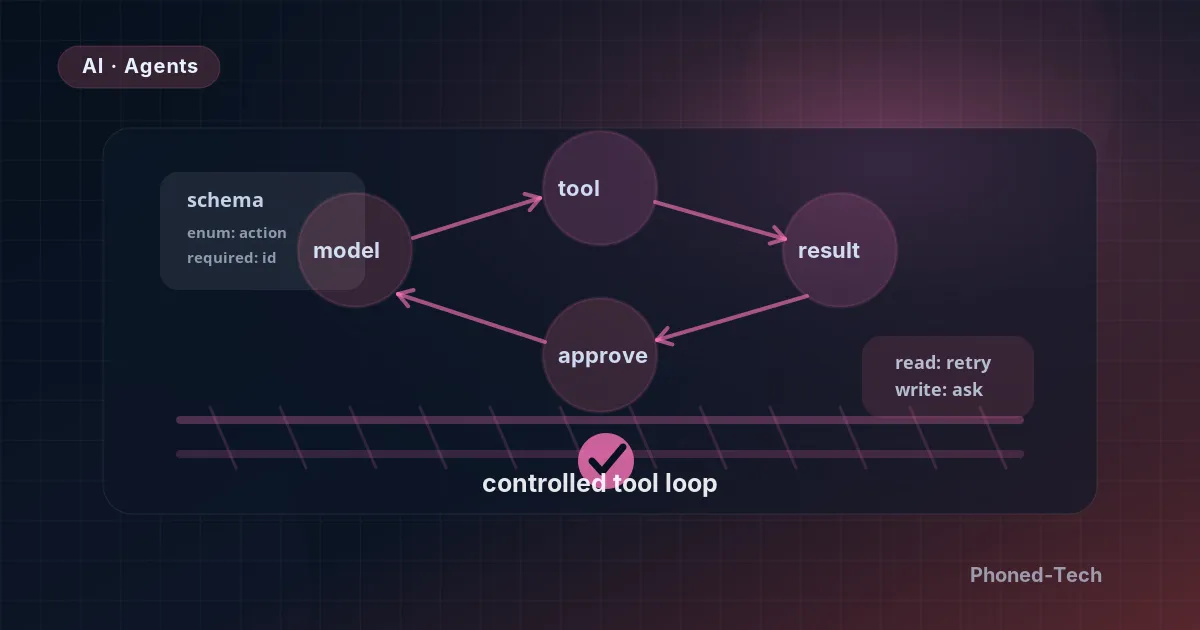
AI agents for business are AI assistants that don’t just answer questions. They do things. An agent can look up a customer, draft a price quote, sort an incoming email or update your records. Used well, it takes a lot of routine work off your team. Used badly, it can send the wrong thing to the wrong customer. This guide covers what to let an AI agent do on its own, where a person should press “approve”, and when not to use one at all.
We build systems like this, and not all of them have worked out. What went wrong taught us most of what’s in this guide.
What an AI agent is, in plain words
An agent works step by step. The AI looks at the job and picks the next step, for example “look up this customer”. Our software carries out that step and hands the result back. Then the AI picks the next step. This repeats until the job is done. (Developers call these “tool-using agents”. The tools are the actions you allow the AI to take.)
When agents fail, it’s rarely because the AI isn’t clever enough. It’s because of the rules around it: what it’s allowed to do, what happens when something goes wrong, and who checks its work.
Rule 1: Be exact about what it may do
The AI can only take the actions you give it, and it reads your instructions very literally. If an action is described simply as “send an email”, it will use it for anything that looks like an email: drafts, reminders, notices you never meant it to send. If the description says “send an email to a customer, and only after a person has confirmed it”, it behaves very differently.
So we keep each action narrow and clearly described. And we check every request the AI makes before anything actually happens. Sooner or later, the AI will fill in a detail that looks believable but doesn’t exist. Those checks catch it before it reaches your customers or your records.
Rule 2: Decide what happens when something fails
Things go wrong online all the time. A connection drops. A service is busy for a moment. The obvious fix is “just try again”. Whether that’s safe depends on what the AI was doing.
So we split every action into two groups:
- Looking things up, like searching a catalog or checking a customer’s details. If this fails, the system quietly tries again. Nothing has changed, so there’s no harm.
- Changing things, like sending, creating, updating or deleting. These are never repeated automatically. The AI is told the step failed. Then it decides: try once more, ask a person, or pass it to your team.
Why so strict? Because “just try again” on a shaky connection is how a business ends up sending a supplier the same purchase order three times.
Rule 3: Keep a person in charge of the big decisions
Every agent we build has at least one action that needs a person’s approval. The AI prepares the action. Someone on your team sees it on screen and clicks “approve” or “reject”. The AI carries on from there.
The hard part is making that check quick. If approving takes thirty seconds because someone has to dig around for the background, people stop reading and just click “yes”. A check nobody reads isn’t a check. So next to each proposed action, we show the AI’s reasoning: why it wants to do this, not only what it wants to do. Your team can judge it at a glance.
Three examples
Price quotes for a distributor. A distributor that sells to other businesses gets a steady stream of requests for price quotes. The agent reads each request, drafts a quote from a large product catalog, and adds it to a list waiting for review. Someone on the sales team checks it and clicks “send”. Looking things up happens automatically. Sending is always a person’s decision.
Support requests for a software company. The agent reads each new request, looks up the customer, matches the problem to a list of known problem types, and suggests what to do next. Simple steps happen on their own, like closing a duplicate request or asking the customer for more details. Bigger ones, like a refund or suspending an account, wait for a person to approve. Anything it did on its own, the support team can undo in one click.
Update notes for an in-house tech team. Every time the developers change their software, someone has to write a short note explaining what changed. The agent reads each change and writes a first draft. Nothing goes out on its own. A person checks every draft. The win isn’t replacing anyone. It’s that nobody has to start from a blank page at the end of a long day.
The one we switched off
We also built an agent that decided on its own when to release updates to software that people were already using. It based those decisions on numbers from the tools that track how the software is running. In testing, it worked. In real use, it often made the right call for the wrong reasons. Then, when one of the sources it relied on stopped updating, it sometimes made the wrong call with full confidence. Its habit of trying again automatically made the mistakes pile up. So we switched it off.
Where AI agents fit, and where they don’t
That failure taught us a simple rule. AI agents are a poor fit when one wrong decision is costly and hard to recover from. They are a good fit for three kinds of work:
- Lots of repetitive work, where any single mistake is cheap to fix
- First drafts that a person checks: quotes, replies, notes, reports
- Sorting incoming requests and deciding who should handle them
A quick test for any task: if the AI got it wrong, could you undo it with one click? If yes, it may be a good job for an agent. If not, keep a person in charge.
Before you start, answer four questions
- Which tasks take up your team’s time every day?
- For each one, what can the AI do alone, and what needs a person’s OK?
- What should happen when a step fails?
- Can every automatic action be undone easily?
You don’t need technical answers. You know your business, and that’s what matters here. We write your answers down as the rules the agent follows, and agree them with you in writing before anything is built.
We build AI chatbots and AI agents for business with these rules in place from day one. If you’re wondering where an agent could save your team time, book a free 30-minute call. We’ll look at your daily work together and tell you honestly whether AI is the right answer.