
Every business system does work you never see. A customer places an order, and behind the scenes the system sends a confirmation email, creates the invoice, updates your stock and tells the warehouse. Those tasks wait in line on a to-do list, and the system works through them in the background.
Many business owners are told they need a separate, more complex tool to manage that list. “Do we really need it?” is the question we hear most often. Our answer is almost always “not yet.” A simpler system costs less to run, has fewer parts that can break, and is easier to fix when something goes wrong. The same goes for custom software built for your business, for online stores, and for the tools you connect so they talk to each other.
Here’s how to tell whether simple is still enough for your business, and what to do when it isn’t.
The simple setup many businesses already have
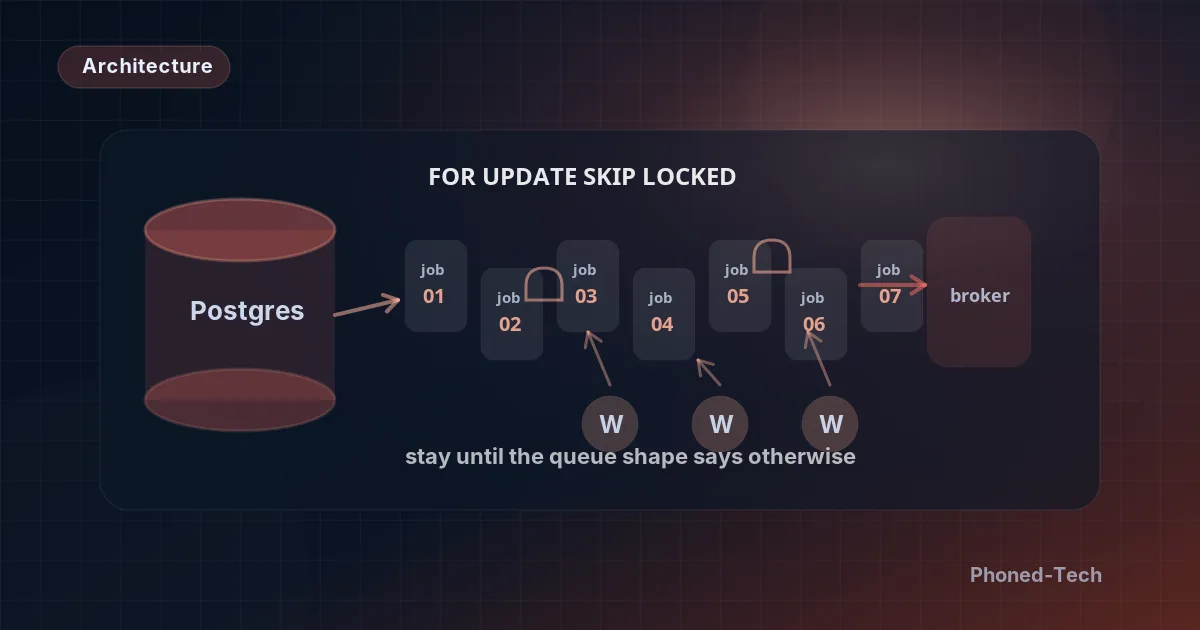
Many of the systems we review keep this to-do list inside their main database: the same place they keep customers, orders and invoices. (Developers call this “using Postgres as a queue.”)
It’s the cheapest way to do it, and it works much better than most people expect. For most businesses, one list like this can handle thousands of tasks a minute without breaking a sweat.
Here’s how it works:
- A task is added to the list, for example “send an order confirmation to this customer.”
- A background helper (a small part of your system that does the tasks) picks up the next one and marks it “in progress,” so no other helper grabs the same task.
- The helper does the work.
- If it worked, the task comes off the list. If it failed, the system makes a note and tries again later.
Why simple saves you money and trouble
Keeping the list in your main database has real advantages:
- Nothing new to keep an eye on. Your database is already checked for problems, so the to-do list is covered too.
- Nothing new to back up. Your database is already backed up, so the tasks waiting in line are safe too.
- No half-finished work. A task can be saved together with the order it belongs to. Either both are saved or neither is. So you never get an order the system “forgot” to confirm.
- Problems are easy to find. When a task fails, your team can look it up the same way they look up an order. No outside service, no extra dashboard to log into.
- One less bill. There’s no extra service to pay for, set up and look after.
Every tool you add is one more thing to pay for, one more thing to learn, and one more thing that can stop working on your busiest day.
Three signs you’ve outgrown it
Simple won’t be enough forever. These three signs tell you it’s time to move to a separate tool built just for this job.
1. Your system slows down at random times. When millions of tasks pass through the list every day, the leftovers pile up faster than the database can clear them away. Then the speed starts to jump around: slow, then fast, then slow again. Splitting the list up by date helps for a while, but in the end it stops helping.
2. The background helpers crowd out everyone else. Each helper keeps its own line open to the database, and a database can only handle so many open lines. For example, if 50 helpers each keep a line open, the to-do list alone can take up half of what your database can handle. That leaves less room for your customers and your staff. Two things help: letting helpers share lines, and making each helper faster so you need fewer of them.
3. One task needs to set off many others. Say a single new order has to start ten follow-up tasks across several different systems. A simple list can do this, but the setup becomes fragile and easy to break. This is the point where a separate tool built for the job is worth what it costs.
How to switch without losing anything
Here’s the approach that works:
Step 1: Prepare first. Before changing anything, make sure every part of the system adds and picks up tasks through one single doorway. At first, that doorway still leads to the old list. Later, when you switch, only what’s behind the doorway has to change. This step is often the biggest part of the whole job.
Step 2: Run both side by side for two weeks. Every new task goes into both the old list and the new tool. The new tool does the work. The old list stays as a safety net in case anything goes wrong.
Step 3: Switch off the old list. After two weeks, stop sending tasks to the old list.
Don’t skip the two weeks. Without them, you can lose tasks. A lost task can mean a customer who never got their email, or an order that never reached the warehouse.
A simple rule of thumb
Here’s the rough rule we use, based on how many background tasks your system handles a day:
- Under 100,000 a day: stay with the simple setup, unless you have a specific reason to change.
- Between 100,000 and 1 million a day: it depends on how the work arrives. A steady flow is fine. Big sudden rushes, like during a flash sale, are harder.
- Over 1 million a day: you’ve usually outgrown it. At that size, a separate tool costs little compared with the headaches of stretching the simple setup.
One thing to fix first
In most systems, simple or complex, the same task can now and then be carried out twice, for example after a short glitch. What matters is that doing a task twice does no harm. A customer shouldn’t get two invoices or be charged twice.
If that’s a risk in your system, fix it first. Moving to a bigger tool won’t solve it.
The bottom line
Simple isn’t cutting corners. For most businesses it’s the smart choice: lower running costs, fewer things that can break and fewer surprises. Move to something bigger when the warning signs show up, not before. And when you do, switch carefully, one step at a time.
Not sure whether your system needs a bigger setup or just some tidying up? Book a free 30-minute call and we’ll talk it through in plain words.