
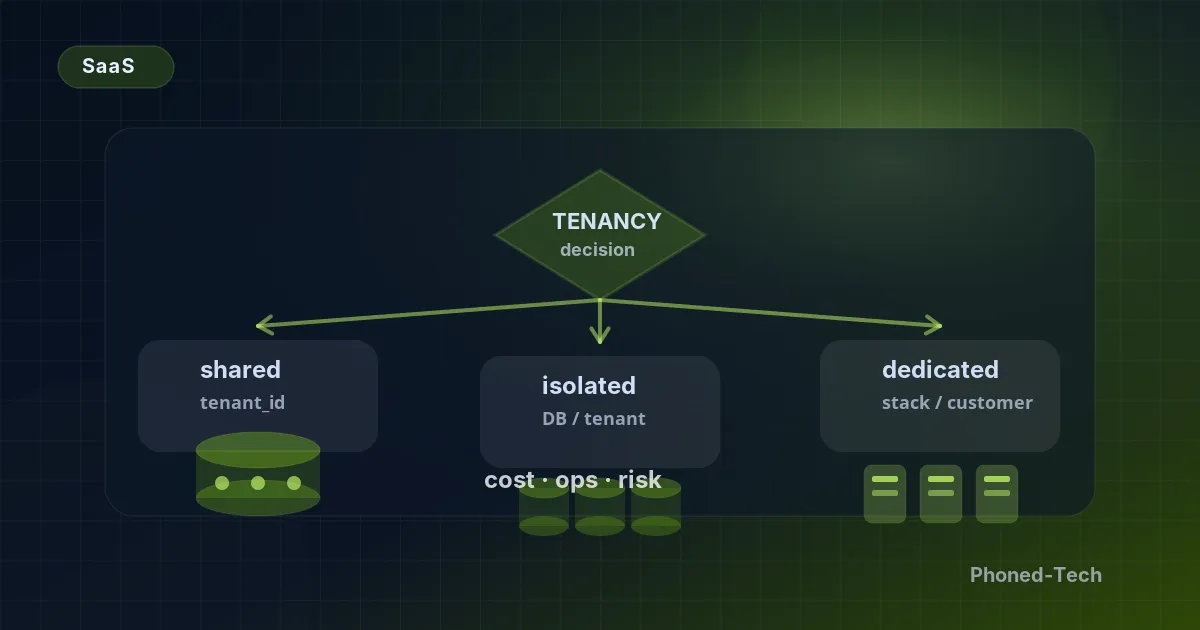
If you’re building software that other businesses pay to use, like a booking system for clinics or an ordering tool for restaurants, this question will come up sooner or later. Should all your customers use one system on shared servers, or should each one get dedicated servers of their own? (Engineers call this “multi-tenant or dedicated”.) It sounds technical, but it’s really a business decision. It affects what you pay each month to keep the system running, which customers will sign with you, and how you set your prices.
Most founders who sell software to other businesses ask this at some point. Our honest answer: usually both, in stages, and the order matters. Here’s how we help them decide.
Three options, not two
Most people think there are only two choices: everyone shares one system, or every customer gets their own. There’s a third option in the middle that almost nobody mentions at the start. It’s where most successful software products end up.
A simple way to picture all three:
- Shared is an office building with one big file room. Every customer’s files sit in the same room. Each folder has the customer’s name on it, and the clerk only ever hands you your own.
- Separate data is the same building, but every customer has their own locked file room.
- Dedicated means every customer gets a building of their own.
Each option costs a different amount to run, protects your customers’ information in a different way, and takes a different amount of work to keep going.
Shared: the right start for your first 100 customers
All your customers use the same system, and their information is stored together. Every record is labelled with the customer it belongs to, and the system only ever shows people their own. For extra safety, you can add a second, automatic check underneath. Then one mistake can’t show a customer someone else’s records.
This is the cheapest option to run. It’s also the quickest to add new features to, and the easiest to fix when something goes wrong.
It stops working well when:
- One customer has so much information that reports and searches get slow for everyone else.
- A customer’s security check makes “keep our information completely separate” a condition in the contract.
- You start signing customers in fields with strict rules about information, such as health or finance.
Separate data: the step most teams underestimate
Here, each customer’s information is kept in its own separate storage, while the software itself is still shared. Every time someone logs in, the system connects them only to their own company’s storage.
What you gain:
- A customer who uses the system very heavily no longer slows everyone else down.
- Customers’ security checks stop holding up your sales.
- You can keep a customer’s information in the country or region they prefer.
What it costs is mostly extra work behind the scenes:
- Every update has to be applied to each customer’s storage, not just once.
- Backups are made separately for each customer.
- A report that covers all your customers together now needs its own setup to collect the numbers.
This is the step teams most often expect to be easy. It isn’t, so plan time for it.
Dedicated: a different kind of business
With dedicated, each customer gets a complete setup of their own: their own servers, their own storage, often their own web address, and sometimes even their own cloud account.
This is how we run PhonedCRM. Every client gets their own CRM, set up for the way their business works, on a completely separate server sized to their needs. Nothing is shared with other businesses. There’s no public price list: we quote each client separately, based on what they need.
And that’s the key point. Dedicated isn’t an extra feature you switch on. It’s a different way of doing business: you charge for each customer’s setup, not for each user.
Why choose it? It lets you sell to customers the other options can’t reach. Some health and finance regulators require it.
What it takes:
- A way to set up a complete new copy for a customer in under an hour.
- A way to watch each customer’s setup on its own, so you spot a problem with any one of them quickly.
- Prices that cover the real cost of running each customer’s setup.
How to choose
These are the questions we walk through with founders:
- Are you signing your first ten customers? Go shared. Always.
- Are your customer contracts getting larger? Start planning the move to separate data now, not later.
- Are you selling to health care providers, banks or government offices? Go dedicated, and offer separate data to smaller customers in the same field.
- Are you trying to win one big customer who insists on their own setup? Build it for them, but charge them for the work. Don’t let one deal eat the time you should spend improving your product for everyone.
The one thing nobody tells you
Moving from shared to separate data is hard, but doable. Moving from separate data to dedicated is doable too. Going backwards, from dedicated to separate data, is a project that can take many months. And your customers won’t see any benefit from it.
So start simple, and don’t go dedicated until you have to.
Buying software rather than building it?
The same question matters when you choose software for your own business, such as a CRM. Before you sign, ask the provider:
- Is my information stored together with other companies’ information, or kept separately?
- If I need it, can I have my own separate server?
- In which country is my information kept?
Clear, simple answers are a good sign.
Not sure which option fits your business? Book a free 30-minute call. We’ll listen, ask a few questions, and send you a short written summary, whether or not we end up working together. You can also read more about PhonedCRM and the software products we build.